
HP ProLiant BL2x220c G7 Server Blade Maintenance and Service Guide



Removal and replacement procedures 23
Access the internal server components
To access internal server components, remove server B assembly from server A assembly.
WARNING: To reduce the risk of personal injury from hot surfaces, allow the drives and the
internal system components to cool before touching them.
CAUTION: To prevent damage to electrical components, properly ground the server blade
before beginning any installation procedure. Improper grounding can cause ESD.
Remove the server B assembly
For access component identification, see "Access components (on page 58)."
To remove the component:
1. Power down the server blade (on page 21).
2. Remove the server blade (on page 22).
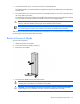
3. Place the server blade on a flat, level work surface with the bezel facing away from you.
CAUTION: The jackscrews control the unseating and seating of critical system connectors.
Failure to use the jackscrews to remove and install the server B assembly can cause the system
boards to fail.
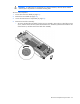
4. Turn jackscrew 1 approximately six turns counterclockwise.
5. Turn jackscrew 2 counterclockwise until the threads are fully disengaged.
6. Turn jackscrew 1 counterclockwise until the threads are fully disengaged.
CAUTION: To prevent damage to the server blade, do not apply pressure to the enclosure
connector.
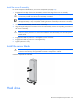
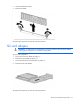
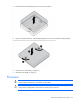
7. Lift the server B assembly from the server A assembly, and then place it on the work surface with the
system board facing up.