
HP ProLiant BL2x220c G7 Server Blade Maintenance and Service Guide



Removal and replacement procedures 28
Heatsink
WARNING: To reduce the risk of personal injury from hot surfaces, allow the drives and the
internal system components to cool before touching them.
To remove the component:
1. Power down the server blade (on page 21).
2. Remove the server blade (on page 22).
3. Access the internal server components (on page 23).
CAUTION: To avoid damage to the system board, alternate removing or tightening the heatsink
screws.
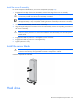
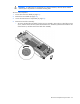
4. Remove the heatsink.
CAUTION: To avoid possible thermal damage, install replacement heatsinks as indicated on the
heatsink labels. The heatsinks are not interchangeable between server A and server B or between
processor 1 and processor 2 within a server.
To replace the component:
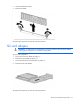
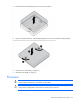
1. Clean the old thermal grease from the processor with the alcohol swab. Allow the alcohol to evaporate
before continuing.