
HP ProLiant BL685c G7 Server Blade Maintenance and Service Guide

Cabling 49
NOTE:
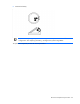
For this configuration, a USB hub is not necessary. To connect additional devices, use a
USB hub.
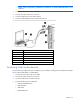
1. Connect the SUV cable to the server blade.
2. Connect the video connector to a monitor.
3. Connect a USB mouse to one USB connector.
4. Connect a USB keyboard to the second USB connector.
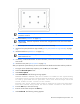
Item Description
1
Monitor
2
USB mouse
3
HP c-Class Blade SUV Cable
4
Video connector
5
Server blade
6
USB keyboard
Accessing local media devices
Use the following configuration when configuring a server blade or loading software updates and patches
from a USB CD/DVD-ROM or a USB diskette.
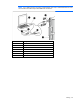
1. Connect the SUV cable to the server blade.
2. Connect the video connector to a monitor.
3. Connect a USB hub to one USB connector.
4. Connect the following to the USB hub:
o USB CD/DVD-ROM drive
o USB keyboard
o USB mouse
o USB diskette drive