
HP ProLiant DL380 Generation 5 Server Maintenance and Service Guide


Removal and replacement procedures 30
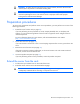
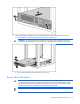
3. After performing the installation or maintenance procedure, slide the server back into the rack:
a. Press the server rail-release latches and slide the server fully into rack.
WARNING: To reduce the risk of personal injury, be careful when pressing the server rail-
release latches and sliding the server into the rack. The sliding rails could pinch your fingers.
b. Press the server firmly into the rack to secure it in place.
Power down the server
WARNING: To reduce the risk of personal injury, electric shock, or damage to the
equipment, remove the power cord to remove power from the server. The front panel Power
On/Standby button does not completely shut off system power. Portions of the power supply
and some internal circuitry remain active until AC power is removed.
IMPORTANT: If installing a hot-plug device, it is not necessary to power down the server.