
Compaq Parallel Database Cluster Model PDC/O1000 for Oracle8i and Windows 2000 Administrator Guide


2-28 Compaq Parallel Database Cluster Model PDC/O1000 for Oracle8i and Windows 2000 Administrator Guide
Compaq Confidential – Need to Know Required
Writer: John Blackburn Project: Compaq Parallel Database Cluster Model PDC/O1000 for Oracle8i and Windows 2000 Administrator Guide
Comments:
Part Number: 225083-002 File Name: c-ch2 Cluster Architecture.doc Last Saved On: 6/11/01 11:20 AM
Because Ethernet switches are required in PDC/O1000 clusters with three or
more nodes, using an Ethernet switch instead of a crossover cable makes it
easier to upgrade the cluster interconnect if more servers are added to the
cluster.
IMPORTANT: Crossover cables and Ethernet hubs cannot be used in PDC/O1000 clusters
with a redundant Ethernet cluster interconnect or in PDC/O1000 clusters with three or
more nodes.
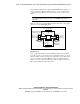
Figure 2-14 shows the redundant Ethernet cluster interconnect components
used in a two-node PDC/O1000 cluster.
Node 1
Node 2
Client LAN
Hub/Switch #1
Client LAN
Hub/Switch #2
Ethernet Switch/Hub #2
for Cluster Interconnect
Ethernet Switch/Hub #1
for Cluster Interconnect
Crossover
Cable
Dual-port
Ethernet
Adapters (2)
Dual-port
Ethernet
Adapters (2)
Crossover
Cable
Figure 2-14. Redundant Ethernet cluster interconnect for a two-node
PDC/O1000 cluster
These components include two dual-port Ethernet adapters in each cluster
node. The top port on each adapter connects by Ethernet cable to one of two
Ethernet switches or hubs provided for the cluster interconnect. The bottom
port on each adapter connects by Ethernet cable to the client LAN for the
cluster. A crossover cable is installed between the two Ethernet switches or
hubs used in the Ethernet cluster interconnect.