
Compaq Parallel Database Cluster Model PDC/O1000 for Oracle8i and Windows 2000 Administrator Guide
4-12 Compaq Parallel Database Cluster Model PDC/O1000 for Oracle8i and Windows 2000 Administrator Guide
Compaq Confidential – Need to Know Required
Writer: John Blackburn Project: Compaq Parallel Database Cluster Model PDC/O1000 for Oracle8i and Windows 2000 Administrator Guide
Comments:
Part Number: 225083-002 File Name: e-ch4 Cluster Planning.doc Last Saved On: 6/11/01 11:20 AM
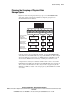
The larger configuration shown in Figure 4-4 contains these hardware
components:
■ Six ProLiant servers (cluster nodes)
■ One Fibre Host Adapter in each cluster node
■ One Storage Hub or FC-AL Switch to connect the RA4000/RA4100
Arrays to the Fibre Host Adapters
■ Six RA4000/RA4100 Arrays
■ One RA4000 Array Controller in each RA4000/RA4100 Array
■ Ethernet NIC adapters, cables, and Ethernet switches or hubs for the
Ethernet cluster interconnect (not shown)
■ Ethernet NIC adapters, cables, and switches or hubs for the client LAN
(not shown)
RAID Planning
Shared storage subsystem performance is one of the most important aspects of
tuning database cluster servers for optimal performance. Efforts to plan,
configure, and tune a PDC/O1000 cluster should focus on getting the most out
of each shared disk drive and having an appropriate number of shared drives in
the cluster. When properly configured, the shared storage subsystem should
not be the limiting factor in overall cluster performance.
RAID technology provides cluster servers with more consistent performance,
higher levels of fault tolerance, and easier fault recovery than non-RAID
systems. RAID uses redundant information stored on different disks to ensure
that the cluster can survive the loss of any disk in the array without affecting
the availability of data to users.
RAID also uses the technique of striping, which involves partitioning each
drive’s storage space into units ranging from a sector (512 bytes) up to several
megabytes. The stripes of all the disks are interleaved and addressed in order.