
Compaq Parallel Database Cluster Model PDC/O1000 for Oracle8i and Windows 2000 Administrator Guide

Cluster Planning 4-17
Compaq Confidential – Need to Know Required
Writer: John Blackburn Project: Compaq Parallel Database Cluster Model PDC/O1000 for Oracle8i and Windows 2000 Administrator Guide
Comments:
Part Number: 225083-002 File Name: e-ch4 Cluster Planning.doc Last Saved On: 6/11/01 11:20 AM
Planning the Grouping of Physical Disk
Storage Space
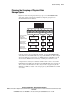
Figure 4-5 shows how the physical storage space in one RA4000/RA4100
Array that contains eight physical disk drives might be grouped for an
Oracle8i Parallel Server database.
RA4000/4100 Array
Disk
Drive
Disk
Drive
Disk
Drive
Disk
Drive
Disk
Drive
Disk
Drive
Disk
Drive
Disk
Drive
Create extended
partitions with
Disk Management
Extended
Partition
Extended
Partition
Extended
Partition
RAID 5
Disk Array
Create logical drive
arrays with
Compaq Array
Configuration Utility
RAID 1
Disk Array
RAID 1
Disk Array
Create logical
partitions with
Disk Management
/ D / E / F / G /H / I / J /
/ K / L / / M / N /
Figure 4-5. RA4000/RA4100 Array disk grouping for a PDC/O1000 cluster
Using the Compaq Array Configuration Utility, group the RA4000/RA4100
Array disk drives into RAID disk arrays at specific RAID levels. This example
shows four disk drives grouped into one RAID disk array at RAID level 5. It
also shows two RAID level 1 disk arrays containing two disk drives each.
A logical drive is what you see labeled as Disk 1, Disk 2, and so on, from the
Disk Management utility. For information about RAID disk arrays and logical
drives, refer to the information on drive arrays in the Compaq StorageWorks
RAID Array 4000 User Guide or the Compaq StorageWorks RAID Array 4100
User Guide.