
Compaq Parallel Database Cluster Model PDC/O1000 for Oracle8i and Windows 2000 Administrator Guide

Installation and Configuration 5-5
Compaq Confidential – Need to Know Required
Writer: Carol Tatick Project: Compaq Parallel Database Cluster Model PDC/O1000 for Oracle8i and Windows 2000 Administrator Guide Comments:
Part Number: 225083-002 File Name: f-ch5 Installation and Configuration.doc Last Saved On: 6/11/01 12:06 PM
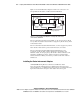
To install GBIC-SW modules:
1. Verify that a GBIC-SW module has been installed in each Fibre Host
Adapter in a server.
2. Insert a GBIC-SW module into the port for the Fibre Host Adapter on its
Storage Hub, FC-AL Switch, or Fibre Channel SAN Switch.
Cabling the Fibre Host Adapters to the Storage Hub,
FC-AL Switch, or Fibre Channel SAN Switch
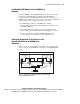
Each non-redundant Fibre Channel Fabric requires on Fibre Channel SAN
Switch. Each non-redundant FC-AL requires one Storage Hub or one FC-AL
Switch. To cable the Fibre Host Adapters to the Storage Hub, FC-AL Switch
or Fibre Channel SAN Switch:
1. Identify the Fibre Host Adapters, Storage Hub, FC-AL Switch or Fibre
Channel SAN Switch, and Fibre Channel cables for the non-redundant
Fibre Channel Fabric or non-redundant FC-AL.
2. Using Fibre Channel cables, connect the Fibre Host Adapter in each
server to the Storage Hub, FC-AL Switch, or Fibre Channel SAN
Switch.
IMPORTANT: When connecting a Fibre Host Adapter to a Storage Hub, FC-AL Switch or
Fibre Channel SAN Switch, do not mount the Fibre Channel cables on cable management
arms. Support the Fibre Channel cable so that a bend radius at the cable connector is not
less than 3 inches.