
Compaq Parallel Database Cluster Model PDC/O1000 for Oracle8i and Windows 2000 Administrator Guide

Installation and Configuration 5-9
Compaq Confidential – Need to Know Required
Writer: Carol Tatick Project: Compaq Parallel Database Cluster Model PDC/O1000 for Oracle8i and Windows 2000 Administrator Guide Comments:
Part Number: 225083-002 File Name: f-ch5 Installation and Configuration.doc Last Saved On: 6/11/01 12:06 PM
Installing GBIC-SW Modules for the RA4000 Array
Controller
For the PDC/O1000, each RA4000/RA4100 Array contains one single-port
Compaq StorageWorks RAID Array 4000 Controller (RA4000 Array
Controller) and ships with GBIC-SW modules. Insert one module into the
RA4000 Array Controller and the other module into the Storage Hub, FC-AL
Switch, or Fibre Channel SAN Switch port for the controller.
To install GBIC-SW modules for an RA4000 Array Controller:
1. Insert one GBIC-SW module into the RA4000 Array Controller in each
RA4000/RA4100 Array.
2. Insert a GBIC-SW module into the port on the Storage Hub, FC-AL
Switch or Fibre Channel SAN Switch for that RA4000 Array controller.
3. Repeat steps 1 and 2 for all other RA4000/RA4100 Arrays in the
non-redundant Fibre Channel Fabric or non-redundant FC-AL.
Cabling the Storage Hub, FC-AL Switch, or Fibre
Channel SAN Switch to the RA4000 Array
Controllers
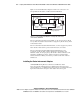
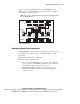
Figure 5-2 shows one Storage Hub, FC-AL Switch, or Fibre Channel SAN
Switch connected to the RA4000 Array Controller in one RA4000/RA4100
Array.
Client LAN
Fibre
Host Adapters
Fibre
Host Adapters
RA4000/4100 Array
Storage Hub/Switch
Switch
(Cluster Interconnect)
ProLiant
Servers
ProLiant
Servers
Figure 5-2. Cabling a Storage Hub, FC-AL Switch, or Fibre Channel SAN
Switch to an RA4000 Array Controller