
Compaq Parallel Database Cluster Model PDC/O1000 for Oracle8i and Windows 2000 Administrator Guide
5-12 Compaq Parallel Database Cluster Model PDC/O1000 for Oracle8i and Windows 2000 Administrator Guide
Compaq Confidential – Need to Know Required
Writer: Carol Tatick Project: Compaq Parallel Database Cluster Model PDC/O1000 for Oracle8i and Windows 2000 Administrator Guide Comments:
Part Number: 225083-002 File Name: f-ch5 Installation and Configuration.doc Last Saved On: 6/11/01 12:06 PM
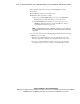
The following components are used in a redundant Ethernet cluster
interconnect:
■ Two Ethernet adapters in each cluster node
■ Ethernet cables and switches or hubs
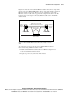
G For two-node PDC/O1000 clusters, you can use two 100-Mbit/sec
Ethernet switches or hubs with cables to connect the servers.
G For PDC/O1000 clusters with three or more nodes, you use two
100-Mbit/sec Ethernet switches connected by Ethernet cables to a
separate Ethernet adapter in each server.
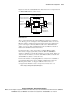
NOTE: In a redundant Ethernet cluster configuration, one Ethernet crossover cable must
be installed between the two Ethernet switches or hubs that are dedicated to the cluster
interconnect.
To connect two nodes in a non-redundant Ethernet cluster interconnect using
an Ethernet crossover cable:
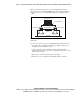
1. In both nodes, install the Ethernet crossover cable into the port on the
Ethernet adapter that is designated for the Ethernet cluster interconnect.
2. If you have a dual-port Ethernet adapter in each node, you can use the
second (lower) port on each to connect to a client LAN hub or switch.