
ProLiant DL580 Generation 5 Maintenance and Service Guide


Removal and replacement procedures 28
3.
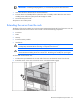
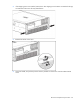
After performing the installation or maintenance procedure, slide the server into the rack by pressing
the server rail-release latches.
Removing the server from the rack
WARNING: The server weighs approximately 36.3 kg–49.9 kg (80 lb–110 lb). To reduce the
risk of injury due to the weight of the server, remove the following components before
removing the server from the rack:
• Processor memory module ("Removing the processor memory module" on page 29)
• Hard drives ("Hard drive" on page 31)
• Power supplies (on page 44)
The server weighs 21.8 kg (48 lb) with these components removed and might require two
people to remove the server from the rack.
1. Power down the server (on page 26).
2. Remove the following components to reduce the weight of the server:
o Processor memory module ("Removing the processor memory module" on page 29)
o Hard drives ("Hard drive" on page 31)
o Power supplies (on page 44)
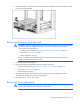
3. Disconnect the cabling, and remove the server from the rack. For more information, see the
documentation that ships with the rack mounting option.
4. Place the server on a sturdy, level surface.
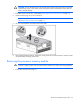
Removing the access panel
WARNING: To reduce the risk of personal injury from hot surfaces, allow the drives and the
internal system components to cool before touching them.