
ProLiant DL580 Generation 5 Maintenance and Service Guide


Removal and replacement procedures 55
WARNING: The server weighs approximately 36.3 kg–49.9 kg (80 lb–110 lb). To reduce the
risk of injury due to the weight of the server, remove the following components before
removing the server from the rack:
• Processor memory module ("Removing the processor memory module" on page 29)
• Hard drives ("Hard drive" on page 31)
• Power supplies (on page 44)
The server weighs 21.8 kg (48 lb) with these components removed and might require two
people to remove the server from the rack.
CAUTION: Before starting this procedure, read the information about protecting against
electrostatic discharge ("Preventing electrostatic discharge" on page 25).
CAUTION: Only authorized technicians trained by HP should attempt to remove the system
board. If you believe the system board requires replacement, contact HP Technical Support
before proceeding.
1. Power down the server (on page 26).
2. Remove the server from the rack ("Removing the server from the rack" on page 28).
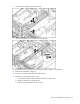
3. Remove the access panel ("Removing the access panel" on page 28).
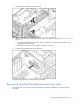
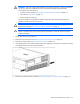
4. If the shipping screws are installed, remove them. The shipping screw locations are marked with tags
on both sides of the server for easy identification.
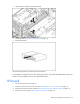
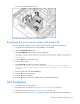
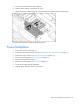
5. Remove the processor memory module ("Removing the processor memory module" on page 29).