
ProLiant DL580 Generation 5 Maintenance and Service Guide


Removal and replacement procedures 56
6.
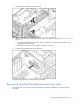
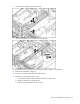
If the bracket is installed, remove the bracket.
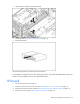
7. Loosen the thumbscrews, and remove the center bracket.
8. Remove the PCI-X or PCI Express x8 3 slot Option Card (on page 48), if installed.
9. Remove the SPI board (on page 53).
10. Disconnect all cables connected to the system board.
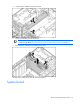
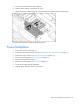
11. Remove the system board from the server.
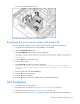
a. To release the handle, slide the latch toward the front of the server.
b. Rotate the handle to an upright position.
c. Slide the board toward the rear of the server.