
XenServer Administrator's Guide 4.1.0

Storage
19
There are two basic steps involved in creating a new storage repository for use on a XenServer Host via
the CLI:
1. Probe the SR type to determine values for any required parameters.
2. Create the SR to create the SR object and associated PBD objects, plug the PBDs, and activate the SR.
These steps differ in detail depending on type of SR being created. In all examples the sr-create command
will return the UUID of the SR if successful.
SRs can also be destroyed when no longer in use to free up the physical device, or forgotten to detach
the SR from one XenServer Host and attach it to another. See Section 3.4.1, “Destroying or forgetting a
SR ” for details.
3.3.2. Probing an SR
The sr-probe CLI command can be used in two ways:
1. To identify unknown parameters for use in creating a SR
2. To return a list of existing SRs
In both cases sr-probe works by specifying an SR type and one or more device-config parameters for
that SR type. When an incomplete set of parameters is supplied sr-probe returns an error message
indicating parameters are missing and the possible options for the missing parameters. When a complete set
of parameters is supplied a list of existing SRs is returned. All sr-probe output is returned as an XML list.
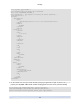
For example, a known iSCSI target can be probed by specifying its name or IP address, and the set of IQNs
available on the server will be returned:
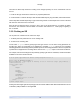
# xe sr-probe type=lvmoiscsi device-config:target=192.168.1.10
Error code: SR_BACKEND_FAILURE_96
Error parameters: , The request is missing or has an incorrect target IQN parameter, \
<?xml version="1.0" ?>
<iscsi-target-iqns>
<TGT>
<Index>
0
</Index>
<IPAddress>
192.168.1.10
</IPAddress>
<TargetIQN>
iqn.192.168.1.10:filer1
</TargetIQN>
</TGT>
</iscsi-target-iqns>
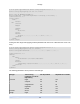
Probing the same target again and specifying both the name/IP address and desired IQN will return the set
of SCSIids (LUNs) available on the target/IQN.