
XenServer Administrator's Guide 4.1.0

Storage
22
Parameter Name Description Required
server IP address or hostname of the
NFS server
Yes
serverpath path, including the NFS mount
point, on the NFS server in which
the SR will reside
Yes
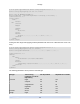
To create a shared nfs SR on 192.168.1.10:/export1 use the following command.
xe sr-create host-uuid=<VALID_UUID> content-type=user \
name-label="Example shared NFS SR" shared=true \
device-config:server=192.168.1.10 device-config:serverpath=/export1 type=nfs
3.3.6. Creating a shared LVM over iSCSI SR using the software iSCSI
initiator (lvmoiscsi)
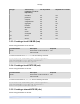
Device-config parameters for lvmoiscsi SRs:
Parameter Name Description Optional
target the IP address or hostname of the iSCSI filer in which the SR will reside yes
targetIQN the IQN target address of iSCSI target in which the SR will reside yes
SCSIid the SCSI bus ID of the destination LUN yes
chapuser the username to be used during CHAP authentication no
chappassword the password to be used during CHAP authentication no
port the network port number on which to query the target no
usediscoverynumber the specific iscsi record index to use no
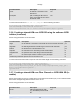
To create a shared lvmoiscsi SR on a specific LUN of an iSCSI target use the following command.
xe sr-create host-uuid=<valid_UUID> content-type=user \
name-label="Example shared LVM over iSCSI SR" shared=true \
device-config:target=<valid_target_IP> device-config:targetIQN=<valid_target_IQN> \
device-config:SCSIid=<valid_SCSIID> \
type=lvmoiscsi
3.3.7. Creating a shared LVM over Fibre Channel or iSCSI HBA SR (lv-
mohba)
SRs of type lvmohba can only be created via the xe Command Line Interface (CLI). Once created lvmohba
SRs can be managed using either XenCenter or the xe CLI.
Device-config parameters for lvmohba SRs:
Parameter name Description Required
Device HBA LUN global device path
(e.g. /dev/disk/by-id/scsi-<SCSI
ID>
Yes