
XenServer Administrator's Guide 4.1.0

Storage
23
To create a shared lvmohba SR perform the following steps on each host in the pool:
1. Zone in one or more LUNs to each XenServer Host in the pool. This process is highly specific to the SAN
equipment in use. Please refer to the documentation for your SAN or contact your storage administrator
for details.
2. If necessary, use the HBA Command Line Interfaces (CLIs) included in the XenServer Host to configure
the HBA:
• Emulex: /usr/sbin/hbanyware
• QLogic FC: /opt/QLogic_Corporation/SANsurferCLI
• QLogic iSCSI: /opt/QLogic_Corporation/SANsurferiCLI
Section 3.3.13 provides an example for configuring the QLogic iSCSI HBA. For more information on Fibre
Channel and iSCSI HBAs please refer to the Emulex and QLogic websites.
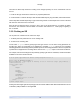
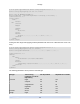
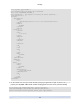
3. Use the sr-probe command to determine the global device path of the HBA LUN. sr-probe will force
a re-scan of HBAs installed in the system to detect any new LUNs that have been zoned to the host
and return a list of properties for each LUN found. Use the host-uuid parameter to ensure the probe
occurs on the desired host.
The global device path returned as the <path> property will be common across all hosts in the pool and
therefore must be used as the value for the device-config:device parameter when creating the SR.
If multiple LUNs are present use the vendor, LUN size, LUN serial number, or the SCSI ID as included
in the <path> property to identify the desired LUN.