
XenServer Administrator's Guide 4.1.0



Command line interface
54
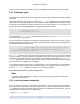
Parameter Name Description Type
managed true if the device is managed read only
xenstore-data Data to be inserted into the xenstore tree read only map parameter
sm-config names and descriptions of storage
manager device config keys
read only map parameter
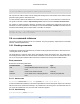
5.4.2.1. cd-list
cd-list [params=param1,param2,... ] [parameter=parameter value ...]
List the CDs and ISOs (CD image files) on the XenServer Host or pool, filtering on the optional argument
params.
If the optional argument params is used, the value of params is a string containing a list of parameters of
this object that you want to display. Alternatively, you can use the keyword all to show all parameters. If
params is not used, the returned list shows a default subset of all available parameters.
Optional arguments can be any number of the CD parameters listed at the beginning of this section.
5.4.3. Console commands
Commands for working with consoles.
The console objects can be listed with the standard object listing command (xe console-list), and the
parameters manipulated with the standard parameter commands. See Section 5.3.2, “Low-level param
commands” for details.
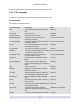
Console parameters
Consoles have the following parameters:
Parameter Name Description Type
uuid The unique identifier/object reference for
the console
read only
vm-uuid The unique identifier/object reference of
the VM this console is open on
read only
vm-name-label The name of the VM this console is open
on
read only
protocol Protocol this console uses. Possible
values are vt100: VT100 terminal, rfb:
Remote FrameBuffer protocol (as used in
VNC), or rdp: Remote Desktop Protocol
read only
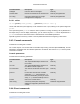
location URI for the console service read only
other-config A list of key/value pairs that specify
additional configuration parameters for the
console.
read/write map parameter
5.4.4. Event commands
Commands for working with events.