
XenServer Administrator's Guide 4.1.0


Command line interface
55
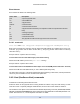
Event classes
Event classes are listed in the following table:
Class name Description
pool A pool of physical hosts
vm A Virtual Machine
host A physical host
network A virtual network
vif A virtual network interface
pif A physical network interface (note separate VLANs are represented as several
PIFs)
sr A storage repository
vdi A virtual disk image
vbd A virtual block device
pbd The physical block devices through which hosts access SRs
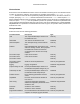
5.4.4.1. event-wait
event-wait class=class name [ param-name=param-value ] [ param-name=/=param-value ]
Block other commands from executing until an object exists that satisfies the conditions given on the com-
mand line. [x=y] means "wait for field x to take value y", and [x=/=y] means "wait for field x to take any
value other than y".
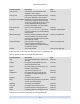
Example: wait for a specific VM to be running
xe event-wait class=vm name-label=myvm power-state=running
blocks until a VM called myvm is in the power-state "running."
Example: wait for a specific VM to reboot:
xe event-wait class=vm uuid=$VM start-time=/=$(xe vm-list uuid=$VM params=start-time --minimal)
blocks until a VM with UUID $VM reboots (i.e. has a different [start-time] value).
The class name can be any of the Event classes listed at the beginning of this section, and the parameters
can be any of those listed in the CLI command class-param-list.
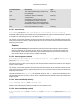
5.4.5. Host (XenServer Host) commands
Commands for interacting with XenServer Hosts.
XenServer Hosts are the physical servers running XenServer software. They have VMs running on them
under the control of a special privileged Virtual Machine, known as the control domain or domain 0.
The XenServer Host objects can be listed with the standard object listing command ( xe host-list, xe host-
cpu-list, and xe host-crashdump-list), and the parameters manipulated with the standard parameter com-
mands. See Section 5.3.2, “Low-level param commands” for details.