
XenServer Administrator's Guide 4.1.0


Command line interface
64
5.4.6.1. log-get-keys
log-get-keys
List the keys of all of the logging subsystems.
5.4.6.2. log-reopen
log-reopen
Reopen all loggers. Use this for rotating log files.
5.4.6.3. log-set-output
log-set-output output=nil | stderr | file:filename | syslog:sysloglocation [key=key ] [level= debug
| info | warning | error]
Set the output of the specified logger. Log messages are filtered by the subsystem in which they originated
and the log level of the message. For example, debug logging messages from the storage manager can
be sent to a file via the following command:
xe log-set-output key=sm level=debug output=file:/tmp/sm.log
The optional parameter key specifies the particular logging subsystem. If this parameter is not set, it will
default to all logging subsystems.
The optional parameter level specifies the logging level. Valid values are debug, info, warning or error.
5.4.7. Network commands
Commands for working with networks.
The network objects can be listed with the standard object listing command (xe network-list), and the
parameters manipulated with the standard parameter commands. See Section 5.3.2, “Low-level param
commands” for details.
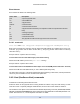
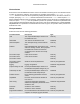
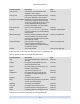
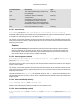
Network parameters
Networks have the following parameters:
Parameter Name Description Type
uuid The unique identifier/object reference for
the network
read only
name-label The name of the network read only
name-description The description text of the network read only
VIF-uuids A list of unique identifiers of the VIFs
(virtual network interfaces) that are
attached from VMs to this network
read only set parameter
PIF-uuids A list of unique identifiers of the PIFs
(physical network interfaces) that are
attached from XenServer Hosts to this
network
read only set parameter
bridge name of the bridge corresponding to this
network on the local XenServer Host
read only