
XenServer Administrator's Guide 4.1.0

Command line interface
66
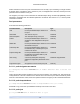
Delete the specified patch file from the XenServer Host.
5.4.8.3. patch-pool-apply
patch-pool-apply uuid=patch UUID
Apply the specified patch to all XenServer Hosts in the pool.
5.4.8.4. patch-precheck
patch-precheck uuid=patch UUID host-uuid=host UUID
Run the prechecks contained within the specified patch on the specified XenServer Host.
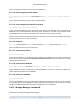
5.4.8.5. patch-upload
patch-upload file-name=patch filename
Upload a specified patch file to the XenServer Host. This prepares a patch to be applied. On suc-
cess, the UUID of the uploaded patch is printed out. If the patch has previously been uploaded, a
PATCH_ALREADY_EXISTS error is returned instead and the patch is not uploaded again.
5.4.9. PBD commands
Commands for working with PBDs (Physical Block Devices). These are the software objects through which
the XenServer Host accesses storage repositories (SRs).
The PBD objects can be listed with the standard object listing command (xe pbd-list), and the parameters
manipulated with the standard parameter commands. See Section 5.3.2, “Low-level param commands” for
details.
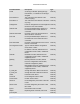
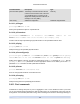
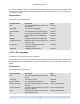
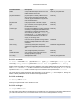
PBD parameters
PBDs have the following parameters:
Parameter Name Description Type
uuid The unique identifier/object reference for
the PBD.
read only
sr-uuid the storage repository that the PBD points
to
read only
device-config additional configuration information that
is provided to the XenServer Host's SR-
backend-driver
read only map parameter
currently-attached Is the SR currently attached on this host?
True or False
read only
host-uuid UUID of the physical machine on which the
PBD is available
read only
5.4.9.1. pbd-create
pbd-create host-uuid=UUID of XenServer Host sr-uuid=UUID of SR [de-
vice-config:key=corresponding value ...]