
XenServer Administrator's Guide 4.1.0

Command line interface
67
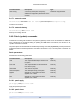
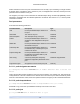
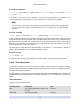
Create a new PBD on a XenServer Host. The read-only device-config parameter can only be set on
creation as in the following example:
To add a mapping of 'path' -> '/tmp', the command line should contain the argument de-
vice-config:path=/tmp
For a full list of supported device-config key/value pairs on each SR type see Chapter 3, Storage.
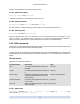
5.4.9.2. pbd-destroy
pbd-destroy uuid=UUID of PBD
Destroy the specified PBD.
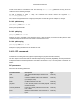
5.4.9.3. pbd-plug
pbd-plug uuid=UUID of PBD
Attempts to plug in the PBD to the XenServer Host. If this succeeds, the referenced SR (and the VDIs
contained within) should then become visible to the XenServer Host.
5.4.9.4. pbd-unplug
pbd-unplug uuid=UUID of PBD
Attempts to unplug the PBD from the XenServer Host.
5.4.10. PIF commands
Commands for working with PIFs (objects representing the physical network interfaces).
The PIF objects can be listed with the standard object listing command (xe pif-list), and the parameters
manipulated with the standard parameter commands. See Section 5.3.2, “Low-level param commands” for
details.
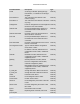
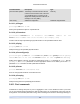
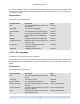
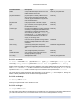
PIF parameters
PIFs have the following parameters:
Parameter Name Description Type
uuid The unique identifier/object reference for
the PIF
read only
device machine-readable name of the interface
(for example, eth0)
read only
MAC the MAC address of the PIF read only
physical If true, the PIF points to an actual physical
network interface
read only
currently-attached Is the PIF currently attached on this host?
true or false
read only
MTU Maximum Transmission Unit of the PIF in
bytes.
read only