
XenServer Administrator's Guide 4.1.0

Command line interface
69
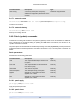
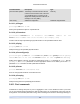
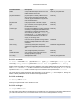
Parameter Name Description Type
pif-metrics-last-updated Timestamp of the date and time that the
metrics for this PIF were read, in the form
yyyymmddThh:mm:ss z, where z is the
single-letter military timezone indicator, for
example, Z for UTC (GMT)
read only
other-config additional configuration read/write map parameter
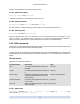
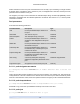
5.4.10.1. pif-forget
pif-forget uuid=UUID of PIF
Destroy the specified PIF object on a particular host.
5.4.10.2. pif-introduce
pif-introduce host-uuid=UUID of XenServer Host mac=MAC address for PIF
device=machine-readable name of the interface (for example, eth0)
Create a new PIF object representing a physical interface on the specified XenServer Host.
5.4.10.3. pif-plug
pif-plug uuid=UUID of PIF
Attempt to bring up the specified physical interface.
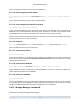
5.4.10.4. pif-reconfigure-ip
pif-reconfigure-ip uuid=UUID of PIF mode=DHCP | mode=static gateway=network gateway
address IP=static IP for this PIF netmask=netmask for this PIF [DNS=DNS address ]
Modify the IP address of the PIF. For static IP configuration, set the mode parameter to static, with the
gateway, IP, and netmask parameters set to the appropriate values. To use DHCP, just set the mode
parameter to DHCP and leave the static parameters undefined.
5.4.10.5. pif-scan
pif-scan host-uuid=UUID of XenServer Host
Scan for new physical interfaces on a XenServer Host.
5.4.10.6. pif-unplug
pif-unplug uuid=UUID of PIF
Attempt to bring down the specified physical interface.
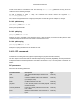
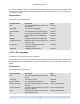
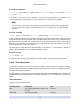
5.4.11. Pool commands
Commands for working with pools. A pool is a aggregate of one or more XenServer Hosts. A pool uses
one or more shared storage repositories so that the VMs running on one XenServer Host in the pool can
be migrated in near-real time (while still running, without needing to be shut down and brought back up) to