
XenServer Administrator's Guide 4.1.0

Command line interface
75
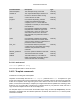
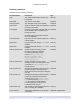
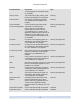
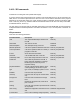
Parameter Name Description Type
name-description The description string of the Task read only
resident-on The unique identifier/object reference of
the host on which the task is running
read only
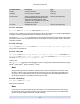
status current status of the Task read only
progress if the Task is still pending, this field
contains the estimated percentage
complete, from 0. to 1. If the Task has
completed, successfully or unsuccessfully,
this should be 1.
read only
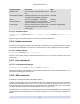
type if the Task has completed successfully,
this parameter contains the type of the
encoded result - that is, the name of the
class whose reference is in the result
field; otherwise, this parameter's value is
undefined
read only
result if the Task has completed successfully,
this field contains the result value, either
Void or an object reference; otherwise, this
parameter's value is undefined
read only
error_info if the Task has failed, this parameter
contains the set of associated error strings;
otherwise, this parameter's value is
undefined
read only
allowed_operations list of the operations allowed in this state read only
created Time the task has been created read only
finished Time task finished (i.e. succeeded or
failed). If task-status is pending, then the
value of this field has no meaning
read only
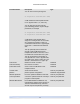
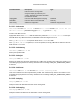
5.4.14.1. task-cancel
task-cancel [uuid=Task UUID ]
Direct the specified Task to cancel and return.
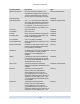
5.4.15. Template commands
Commands for working with VM templates.
Templates are essentially VMs with the is-a-template parameter set to true. A template is a "gold
image" that contains all the various configuration settings to instantiate a specific VM. XenServer ships with
a base set of templates, which range from generic "raw" VMs that can boot an OS vendor installation CD
(RHEL, CentOS, SLES, Windows) to complete pre-configured OS instances (Debian Etch and Sarge). With
XenServer you can create VMs, configure them in standard forms for your particular needs, and save a
copy of them as templates for future use in VM deployment.
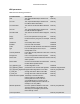
The template objects can be listed with the standard object listing command (xe template-list), and the
parameters manipulated with the standard parameter commands. See Section 5.3.2, “Low-level param
commands” for details.