
XenServer Administrator's Guide 4.1.0

Command line interface
79
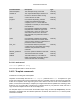
Parameter Name Description Type
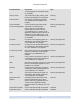
1970 Z (beginning of Unix/POSIX epoch)
for a template
memory-actual The actual memory being used by a VM
based on this template; 0 for a template
read only
VCPUs-number The number of virtual CPUs assigned
to a VM based on this template; 0 for a
template
read only
VCPUs-utilisation A list of virtual CPUs and their weight read only map parameter
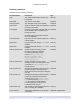
vm-metrics-last-updated Timestamp of the date and time
that the metrics for a VM based on
this template were read, in the form
yyyymmddThh:mm:ss z, where z is the
single-letter military timezone indicator, for
example, Z for UTC (GMT); set to 1 Jan
1970 Z (beginning of Unix/POSIX epoch)
for a template
read only
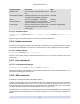
os-version the version of the operating system for a
VM based on this template; appears as
<not in database> for a template
read only map parameter
PV-drivers-version the versions of the paravirtualized drivers
for a VM based on this template; appears
as <not in database> for a template
read only map parameter
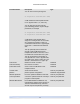
PV-drivers-up-to-date flag for latest version of the paravirtualized
drivers for a VM based on this template;
appears as <not in database> for a
template
read only
memory memory metrics reported by the agent on
a VM based on this template; appears as
<not in database> for a template
read only map parameter
disks disk metrics reported by the agent on a VM
based on this template; appears as <not in
database> for a template
read only map parameter
networks network metrics reported by the agent on
a VM based on this template; appears as
<not in database> for a template
read only map parameter
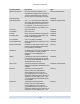
other other metrics reported by the agent on a
VM based on this template; appears as
<not in database> for a template
read only map parameter
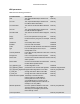
guest-metrics-last-
updated
timestamp when the last write to these
fields was performed by the in-guest
agent, in the form yyyymmddThh:mm:ss
z, where z is the single-letter military
timezone indicator, for example, Z for UTC
(GMT)
read only
actions-after-shutdown action to take after the VM has shutdown read/write
actions-after-reboot action to take after the VM has rebooted read/write