
XenServer Administrator's Guide 4.1.0

Command line interface
82
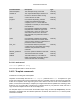
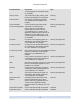
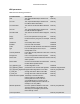
Parameter Name Description Type
links each of the running tasks
using this object (by reference) to a
current_operation enum which describes
the nature of the task.
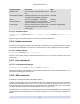
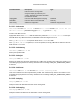
unpluggable true if this VBD will support hot-unplug read/write
attachable true if the device can be attached read only
other-config additional configuration read/write map parameter
5.4.18.1. vbd-create
vbd-create vm-uuid=UUID of the VM device=device value vdi-uuid=UUID of the VDI the
VBD will connect to [bootable=true] [type=Disk | CD ] [mode=RW | RO ]
Create a new VBD on a VM.
Appropriate values for the device field are listed in the parameter allowed-VBD-devices on the spec-
ified VM. Before any VBDs exist there, the allowable values are integers from 0-15.
If the type is Disk, vdi-uuid is required. Mode can be RO or RW for a Disk.
If the type is CD, vdi-uuid is optional; if no VDI is specified, an empty VBD will be created for the CD.
Mode must be RO for a CD.
5.4.18.2. vbd-destroy
vbd-destroy uuid=UUID of VBD
Destroy the specified VBD.
5.4.18.3. vbd-eject
vbd-eject uuid=UUID of VBD
Remove the media from the drive represented by a VBD. This command only works if the media is of a
removable type (a physical CD or an ISO); otherwise an error message "VBD_NOT_REMOVABLE_MEDIA"
is returned.
5.4.18.4. vbd-insert
vbd-insert uuid=UUID of VBD vdi-uuid=UUID of VDI containing media
Insert new media into the drive represented by a VBD. This command only works if the media is of a re-
moveable type (a physical CD or an ISO); otherwise an error message "VBD_NOT_REMOVABLE_MEDIA"
is returned.
5.4.18.5. vbd-plug
vbd-plug uuid=UUID of VBD
Attempt to attach the VBD while the VM is in the running state.
5.4.18.6. vbd-unplug
vbd-unplug uuid=UUID of VBD
Attempts to detach the VBD from the VM while it is in the running state.