
XenServer Administrator's Guide 4.1.0

Command line interface
84
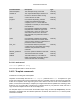
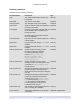
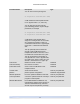
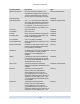
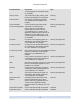
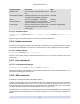
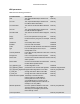
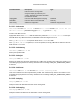
Parameter Name Description Type
location location information read only
managed true if the CDI is managed read only
xenstore-data data to be inserted into the xenstore tree
(/local/domain/0/backend/vbd/<domid>/
<device-id>/sm-data) after the VDI is
attached. This is generally set by the SM
backends on vdi_attach.
read only map parameter
sm-config SM dependent data read only map parameter
5.4.19.1. vdi-clone
vdi-clone uuid=UUID of the VDI [driver-params:key=value ]
Produce a new, writable copy of the specified VDI that can be used directly. It is a variant of vdi-copy that
is capable of exposing high-speed image clone facilities where they exist.
The optional driver-params map parameter can be used for passing extra vendor-specific configuration
information to the back end storage driver that the VDI is based on. See the storage vendor's driver docu-
mentation for details.
5.4.19.2. vdi-copy
vdi-copy uuid=UUID of the VDI sr-uuid=UUID of the SR to where you want to copy the VDI
Copy a VDI to a specified SR.
5.4.19.3. vdi-create
vdi-create sr-uuid=UUID of the SR where you want to create the VDI name-label=name
for the VDI type=system | user | suspend | crashdump virtual-size=size of virtual disk
sm-config-*=storage-specific configuration data
Create a VDI.
The virtual-size parameter can be specified in bytes or using the IEC standard suffixes KiB (2
10
bytes),
MiB (2
20
bytes), GiB (2
30
bytes), and TiB (2
40
bytes).
Note
SR types that support sparse allocation of disks (such as Local VHD and NFS) do not enforce virtual
allocation of disks. Users should therefore take great care when over-allocating virtual disk space
on an SR. If an over-allocated SR does become full, disk space must be made available either on
the SR target substrate or by deleting unused VDIs in the SR.
5.4.19.4. vdi-destroy
vdi-destroy uuid=UUID of VDI
Destroy the specified VDI.
Note
In the case of Local VHD and NFS SR types, disk space is not immediately released on vdi-destroy,
but periodically during a storage repository scan operation. Users that need to force deleted disk
space to be made available should call sr-scan manually.