
XenServer Administrator's Guide 4.1.0


Command line interface
89
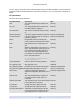
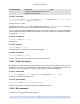
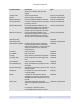
Parameter Name Description Type
suspend-VDI-uuid The VDI that a suspend image is stored on read only
VCPUs-params configuration parameters for the selected
VCPU policy.
You can tune a VCPU's pinning with
xe vm-param-set uuid=<VM UUID> VCPUs-params:mask=1,2,3
The selected VM will then run on physical
CPUs 1, 2, and 3 only.
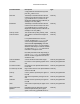
You can also tune the VCPU priority
(xen scheduling) with the cap and weight
parameters; for example
xe vm-param-set uuid=<template UUID> \
VCPUs-params:weight=512
xe vm-param-set uuid=<template UUID> \
VCPUs-params:cap=100
A VM with a weight of 512 will get twice
as much CPU as a domain with a weight
of 256 on a contended XenServer Host.
Legal weights range from 1 to 65535 and
the default is 256.
The cap optionally fixes the maximum
amount of CPU a VM will be able to
consume, even if the XenServer Host has
idle CPU cycles. The cap is expressed in
percentage of one physical CPU: 100 is 1
physical CPU, 50 is half a CPU, 400 is 4
CPUs, etc. The default, 0, means there is
no upper cap.
read/write map parameter
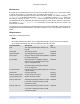
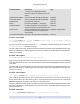
VCPUs-max Maximum number of virtual CPUs. read/write
VCPUs-at-startup Boot number of virtual CPUs read/write
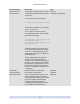
actions-after-crash action to take if the VM crashes. For PV
guests, valid parameters are: preserve
(for analysis only), coredump_and_restart
(record a coredump and reboot VM),
coredump_and_destroy (record a
coredump and leave VM halted), restart
(no coredump and restart VM), and
read/write