
XenServer Software Development Kit Guide 4.1.0

Using the API
22
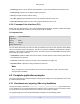
if not(allok):
print "One of the tasks didn't succeed at", \
time.strftime("%F:%HT%M:%SZ", time.gmtime())
idx = 0
for task in tasks:
record = records[task]
vm_name = session.xenapi.VM.get_name_label(vms[idx])
host_name = session.xenapi.host.get_name_label(hosts[idx])
print "%s : %12s %s -> %s [ status: %s; result = %s; error = %s ]" % \
(record["uuid"], record["name_label"], vm_name, host_name, \
record["status"], record["result"], repr(record["error_info"]))
idx = idx + 1
raise "Task failed"
else:
for task in tasks:
session.xenapi.task.destroy(task)
4.3.2. Cloning a VM via the XE CLI
This example (contained in /SDK/client-examples/bash-cli/clone-vms) is a bash script which
uses the XE CLI to clone a VM taking care to shut it down first if it is powered on.
The example begins with some boilerplate which first checks if the environment variable XE has been set: if
it has it assumes that it points to the full path of the CLI, else it is assumed that the XE CLI is on the current
path. Next the script prompts the user for a server name, username and password:
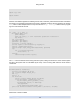
# Allow the path to the 'xe' binary to be overridden by the XE environment varia
ble
if [ -z "${XE}" ]; then
XE=xe
fi
if [ ! -e "${HOME}/.xe" ]; then
read -p "Server name: " SERVER
read -p "Username: " USERNAME
read -p "Password: " PASSWORD
XE="${XE} -s ${SERVER} -u ${USERNAME} -pw ${PASSWORD}"
fi
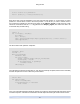
Next the script checks its commandline arguments. It requires exactly one: the UUID of the VM which is
to be cloned: