
XenServer Virtual Machine Installation 4.1.0

14
Chapter 4. Installing Linux VMs
XenServer supports the installation of many Linux distributions into paravirtualized VMs. There are four
installation mechanisms at present: complete distributions provided as built-in templates, Physical-to-Virtual
(P2V) conversion of an existing native instance (see Section 2.4, “Physical to Virtual Conversion (P2V)”),
using the vendor media in the server's physlca DVD/CD drive, and using the vendor media to perform a
network installation.
Installing Linux VMs requires the Linux Pack to be installed onto the XenServer Host.
Warning
If you have not installed the Linux Pack, and you are using XenCenter to install VMs, the New VM
wizard will show only Windows choices in the list. You might be tempted to select Other install media
to install a Linux VMs. This will not work properly and is not supported.
The Other install media template is meant for advanced users who want to attempt installing VMs
running other unsupported operating systems. XenServer has been tested running only the sup-
ported distributions and specific versions covered by the standard supplied templates, and any VMs
installed using the Other install media template are not supported.
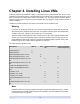
The supported Linux distributions are:
Distribution Built-in P2V Vendor Install from
CD
Vendor Install from
network repository
Debian Sarge 3.1 X
Debian Etch 4.0 X
Red Hat Enterprise Linux 3.6-3.8 X
Red Hat Enterprise Linux 4.1-4.5 X X
Red Hat Enterprise Linux 5.0-5.1 32-
bit
X X
Red Hat Enterprise Linux 5.0-5.1 64-
bit
X X
SUSE Linux Enterprise Server 9 X
SUSE Linux Enterprise Server 10
SP1
X
CentOS 4.5-4.6 X X
CentOS 5.0-5.1 32-bit X X
CentOS 5.0-5.1 64-bit X X
Oracle Enterprise Linux 5.0-5.1 32-
bit
X X
Oracle Enterprise Linux 5.0-5.1 64-
bit
X X
Note
Distributions which use the same installation mechanism as Red Hat Enterprise Linux 5 (e.g. Fedora
Core 6) might be successfully installed using the same template. However, distributions not present
in the above list are not supported.