
XenServer Virtual Machine Installation 4.1.0

Creating VMs
3
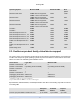
Operating System Minimum RAM Maximum RAM Disk
space
Windows Vista 32-bit 512MB minimum supported,
768MB or more recommended
32GB 16GB
Windows 2003 128MB minimum supported;
256MB or more recommended
32GB 2GB
Windows XP SP2 128MB minimum supported;
256MB or more recommended
32GB 1.5GB
Windows 2000 SP4 128MB minimum supported;
256MB or more recommended
32GB 2GB
CentOS 4 256MB 16GB 800MB
CentOS 5 512MB 16GB 800MB
Red Hat Enterprise Linux 3.6 64MB 32GB 1.5GB
Red Hat Enterprise Linux 4.1, 4.4 256MB 32GB 800MB
Red Hat Enterprise Linux 4.5, 4.6 256MB 16GB 800MB
Red Hat Enterprise Linux 5.0, 5.1 512MB 16GB 800MB
SUSE Linux Enterprise Server 9
SP2
256MB 32GB 1GB
SUSE Linux Enterprise Server 10
SP1
512MB 32GB 1.5GB
Debian Sarge, Etch 128MB 32GB 4GB
2.3. XenServer product family virtual device support
The current version of the XenServer product family has the following general limitations on virtual devices
for VMs. Note that specific guest operating systems may have lower limits for certain features. These limi-
tations are noted in the individual guest installation section.
Virtual device Linux VMs Windows VMs
Number of virtual CPUs 32
a
8
Number of virtual disks 8 (including virtual CD-ROM) 8 (including virtual CD-ROM)
Number of virtual CD-
ROM drives
1 1
Number of virtual NICs 7
b
7
Hotplugging virtual disks add/remove add/remove
Hotplugging virtual NICs add/remove add/remove
a
A maximum of 8 vCPUs are supported via XenCenter.
b
except for SLES 10 SP1 and RHEL 3.x, 4.x, and 5.x, which support 3
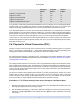
Express Edition, Standard Edition, and Enterprise Edition also differ in the following ways that are relevant
for creating VMs:
Enterprise
Edition
Standard
Edition
Express
Edition
Amount of physical RAM on XenServer Host up to 128GB up to 128GB up to 4GB