
ProLiant ML330 Setup and Installation Guide

3-12 Compaq ProLiant ML330 Setup and Installation Guide
Compaq Confidential – Need to Know Required
Writer: Donna Hollas Project: Compaq ProLiant ML330 Setup and Installation Guide Comments:
Part Number: 173868-001 File Name: d-ch3 Hardware Options Installation.doc Last Saved On: 1/28/00 2:13 PM
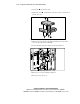
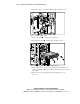
2. Set the drive into the drive tray.
3. Tighten the screws on the bottom of the drive tray to secure the drive
into the drive tray.
2
1
Figure 3-11. Installing a hard drive into removable media bay drive tray
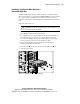
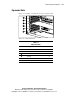
4. Slide the drive tray into the removable media bay, then secure with a
screw on either side of the bezel blank.
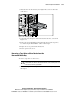
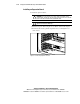
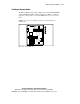
5. Connect the data and power cables to the back of all devices.
Figure 3-12. Connecting the drive cables
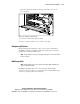
6. Replace the access panel and the front bezel.
7. Restore power to the server.