
ProLiant ML330 Setup and Installation Guide

3-16 Compaq ProLiant ML330 Setup and Installation Guide
Compaq Confidential – Need to Know Required
Writer: Donna Hollas Project: Compaq ProLiant ML330 Setup and Installation Guide Comments:
Part Number: 173868-001 File Name: d-ch3 Hardware Options Installation.doc Last Saved On: 1/28/00 2:13 PM
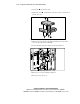
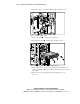
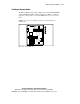
2. Disconnect the power and data cables from the back of the device.
Figure 3-15. Disconnecting the cables
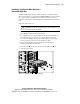
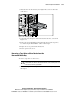
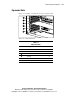
3. Remove the screws on either side of the device.
4. Gently slide the device out from the front of the chassis.
1
1
2
Figure 3-16. Removing a device from the removable media bay
5. Install another device or a drive tray. Replace the bezel blank(s). See
“Removing the Bezel Blanks” and “Removing a Drive Tray” earlier in
this chapter.
6. Replace the access panel and the front bezel. Restore power to
the server.