
ProLiant ML330 Setup and Installation Guide

Hardware Options Installation 3-23
Compaq Confidential – Need to Know Required
Writer: Donna Hollas Project: Compaq ProLiant ML330 Setup and Installation Guide Comments:
Part Number: 173868-001 File Name: d-ch3 Hardware Options Installation.doc Last Saved On: 1/28/00 2:13 PM
Removing a Memory Module
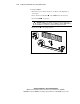
To remove a DIMM:
1. Follow the steps in “Removing the Access Panel” at the beginning of
this chapter.
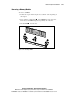
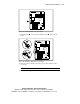
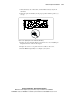
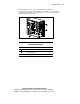
2. Press outward on both latches of the DIMM slot at the same time.
This releases the DIMM and pushes it partially out of the slot.
3. Lift the DIMM from the slot.
1
1
2
Figure 3-22. Removing a DIMM