
Compaq ProLiant ML530 Setup and Installation Guide

3-34 Compaq ProLiant ML530 Setup and Installation Guide
Compaq Confidential – Need to Know Required
Writer: Tricia Acevedo Project: Compaq ProLiant ML530 Setup and Installation Guide Comments:
Part Number: 139006-002 File Name: d-ch3 Installation.doc Last Saved On: 6/15/00 9:02 AM
Powering Up the Server
You can now bring your ProLiant ML530 server online in accordance with
your network and operating system procedures.
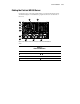
Press the Power On/Standby switch to power on the system.
When the system is first powered on, the system ROM detects the
unconfigured state of the hardware and provides default configuration settings
for most devices. By providing this initialization, the system can run
Diagnostics and other software applications before running the normal
SmartStart and System Configuration programs.
If you insert a System Configuration, Diagnostics, or SmartStart and Support
Software CD in the CD-ROM drive during system power-up, the system ROM
will boot to that utility. If the system ROM does not detect one of those CDs,
you will be prompted for your intended operating system. The system will
reboot if any operating system-dependent configurations have changed with
the new operating system selection. If the selected operating system-dependent
configurations are the same as the current configurations, the system will boot
normally. If you enter a wrong choice, you can change your operating system
selection on subsequent reboots.
Powering Down the Server
The system power in the ProLiant ML530 server does not shut off completely
with the front panel Power On/Standby switch. The two positions of the switch
function as on and standby, rather than on and off. The Standby position
removes power from most of the electronics and the drives, but portions of the
power supply and some internal circuitry remain active.
To remove all power from the system, you must disconnect all power cords
from the server.
WARNING: To reduce the risk of electric shock or damage to the
equipment, disconnect power from the server by unplugging all
power cords from either the electrical outlet or the server.
NOTE: Windows NT users may use the Compaq Power Down Manager to power down
your server. For information, refer to the NTREADME.HLP file on diskette 1 of the Compaq
Support Software Diskette for Windows NT (NTSSD).
1. Press the Power On/Standby switch to place the system in the Standby
mode.