
Compaq ProLiant ML530 Setup and Installation Guide



Server Configuration and Utilities 4-9
Compaq Confidential – Need to Know Required
Writer: Tricia Acevedo Project: Compaq ProLiant ML530 Setup and Installation Guide Comments:
Part Number: 139006-002 File Name: e-ch4 Configuration and Utilities.doc Last Saved On: 6/12/00 4:14 PM
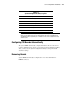
Table 4-1
System Configuration History Log Files
Filename Description
SYSTEM.SCI Current configuration information
SYSTEM1.SCI Previous configuration information
SYSTEM2.SCI Previous configuration information (oldest)
SYSTEM.CHL Textual representation of SYSTEM.SCI file
SYSTEM1.CHL Textual representation of SYSTEM1.SCI file
SYSTEM2.CHL Textual representation of SYSTEM2.SCI file (oldest)
IMPORTANT: If there is not enough disk space for the entire System Configuration
History Log, the utility deletes log files starting with the oldest files (SYSTEM2.SCI and
SYSTEM2.CHL) until enough disk space is available for the current configuration backup
and history files.
Configuring PCI Boards Automatically
The system ROM automatically configures PCI boards. If a user selection is
required, a POST message directs you to run the System Configuration Utility.
Also, you may use the System Configuration Utility to change the default
automatic settings.
Removing Boards
System ROM automatically reconfigures the server after a PCI board or
DIMM is removed.