
Compaq ProLiant ML530 Setup and Installation Guide
5-4 Compaq ProLiant ML530 Setup and Installation Guide
Compaq Confidential – Need to Know Required
Writer: Tricia Acevedo Project: Compaq ProLiant ML530 Setup and Installation Guide Comments:
Part Number: 139006-002 File Name: f-ch5 Cabling Guide.doc Last Saved On: 6/12/00 1:19 PM
SCSI Buses
The Compaq ProLiant ML530 server includes two SCSI buses. One of these
buses, the SCSI B bus, is cabled from the Dual Channel Wide Ultra2 SCSI
adapter channel B to the external SCSI connection on the rear of the server.
The remaining bus is designated the SCSI A bus.
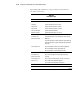
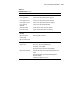
NOTE: To improve serviceability the cables and system board are color coded as follows:
■ Blue = SCSI A
■ Yellow = SCSI B
■ Orange = CD-ROM Drive
■ Purple = Diskette Drive
External Storage Devices
Optional mass storage devices can be connected to the ProLiant ML530 by
attaching an external SCSI cable to one of the SCSI connectors on the system
board and running it to an external connector through a knockout plate on the
back of the server.
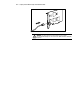
To install an external storage device, refer to the installation documentation
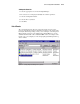
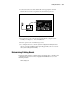
that came with the external storage device. The following illustration provides
only an overview of this installation.
1. If the server is on, place it in Standby mode and disconnect the power
cords. See Chapter 3, “Server Installation.”
2. If the external storage device is on, disconnect the power.
3. Connect one end of the SCSI cable to the external very high-density
connector on the rear panel of the server.