
Compaq ProLiant ML530 Setup and Installation Guide

LED Indicators C-3
Compaq Confidential – Need to Know Required
Writer: Tricia Acevedo Project: Compaq ProLiant ML530 Setup and Installation Guide Comments:
Part Number: 139006-002 File Name: i-appc Status LED Indicators.doc Last Saved On: 6/12/00 2:25 PM
Hot-Plug SCSI Hard Drives
1
2
3
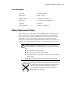
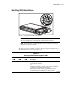
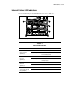
Figure C-2. Hot-plug SCSI hard drive LED indicators
IMPORTANT: Before adding or removing any hot-plug SCSI drives, be sure to set the
drive in the Standby mode, as directed by the operating system instructions.
NOTE: Note that the state of the diagnostic LEDs is only accurate when the drives are
attached to a powered-on controller.
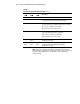
Check the indicators in Table C-2 when replacing hot-plug SCSI hard drives.
The LED indicators are shown in Figure C-2.
Table C-2
Hot-Plug SCSI Hard Drive Diagnostic LEDs
Activity
LED
Online
LED
Fault
LED
Description
Off Off Off The drive is not configured as part of an array and is not being
accessed by the controller.
-or-
The drive is configured as an online spare and is not activated as
a replacement for any failed drive in the array.
OK to replace the drive online, if a predictive failure alert is
received and the drive is attached to an array controller.
continued