
Compaq ProLiant ML530 Setup and Installation Guide

Installing Hardware Options 2-5
Compaq Confidential – Need to Know Required
Writer: Tricia Acevedo Project: Compaq ProLiant ML530 Setup and Installation Guide Comments:
Part Number: 139006-002 File Name: c-ch2 Installing Hardware.doc Last Saved On: 6/13/00 12:29 PM
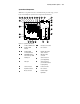
System Board Components
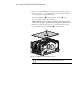
With the access panel removed, as described in the previous steps, you can
locate and identify the system board components shown below.
13
14
15
16
17
18
192021222324
11 121098765432
1
26
27
25
Figure 2-2. System board features
32-bit, 33-MHz PCI slot
-
Intel processor sockets
-
64-bit, 33-MHz
PCI slots
Fan connector
-
64-bit, 66-MHz
3 volt only PCI slots
Diskette drive signal
cable connector
-
Eight DIMM memory
sockets for up to 4 GB
IDE signal cable
connector
Parallel port SCSI connector A -
(to hot-plug drives)
Video port SCSI connector B -
(to removable media or
hot-plug drives)
Serial connectors
-
Power connectors
Keyboard connector Fan connector
Mouse connector Remote Insight
Lights-Out