
Compaq ProLiant ML530 Setup and Installation Guide


2-10 Compaq ProLiant ML530 Setup and Installation Guide
Compaq Confidential – Need to Know Required
Writer: Tricia Acevedo Project: Compaq ProLiant ML530 Setup and Installation Guide Comments:
Part Number: 139006-002 File Name: c-ch2 Installing Hardware.doc Last Saved On: 6/13/00 12:29 PM
Memory
When you add memory in the Compaq ProLiant ML530 server, you can add a
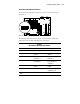
single DIMM at a time. DIMM sockets on the system board are identified in
the following figure. DIMM sockets are also identified on a label on the inside
of the access panel.
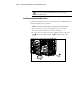
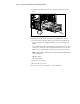
DIMM Sockets on the System Board
The DIMM sockets are located on the system board as shown below.
DIMM5
DIMM6
DIMM7
DIMM8
DIMM1
DIMM2
DIMM3
DIMM4
Figure 2-7. Locating DIMMs on the system board
Installing DIMMs
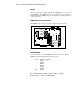
You can add memory a single DIMM at a time. For the best performance,
DIMM sockets should be filled in the following order:
First: Socket 1 (as shipped)
Socket 5
Socket 2
Socket 6
Socket 3
Socket 7
Socket 4
Last: Socket 8
■ 133-MHz SDRAM, 64 MB, 128 MB, 256 MB, or 512 MB
■ Expandable to 4 GB (8 x 512-MB DIMMs)