
Compaq ProLiant ML530 Setup and Installation Guide


2-12 Compaq ProLiant ML530 Setup and Installation Guide
Compaq Confidential – Need to Know Required
Writer: Tricia Acevedo Project: Compaq ProLiant ML530 Setup and Installation Guide Comments:
Part Number: 139006-002 File Name: c-ch2 Installing Hardware.doc Last Saved On: 6/13/00 12:29 PM
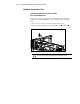
Pulling the System Board Tray
Pulling the System Board Tray to Access Drive
Fans and SCSI Backplanes
To allow access to the hot-plug drive fans, hot-plug SCSI drive backplanes,
diskette drive, and the CD-ROM drive, pull or slide the system board tray
back.
1. Remove the access panel, as described earlier in this chapter.
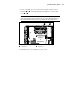
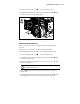
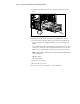
2. Remove the drive air baffle. Loosen two thumbscrews and lift out .
2
1
1
Figure 2-9. Removing the drive air baffle
CAUTION: Electrostatic discharge can damage electronic components. Be sure
you are properly grounded before beginning any installation procedure.