
Compaq ProLiant ML530 Setup and Installation Guide


Installing Hardware Options 2-13
Compaq Confidential – Need to Know Required
Writer: Tricia Acevedo Project: Compaq ProLiant ML530 Setup and Installation Guide Comments:
Part Number: 139006-002 File Name: c-ch2 Installing Hardware.doc Last Saved On: 6/13/00 12:29 PM
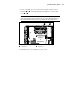
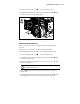
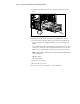
3. To release the latch, press down , as shown in Figure 2-10.
4. Carefully pull or slide the system board tray back by the handle until
it catches, as shown in the following figure.
3
3
2
1
Figure 2-10. Pulling the system board tray back
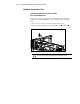
Removing the System Board Tray
If the tray needs to be removed or pulled back farther, use the following
procedure:
1. Remove the access panel, as described earlier in this chapter.
2. Before pulling the tray back, remove the air baffle as shown earlier.
3. To release the latch, press down , as shown in Figure 2-10.
4. Carefully pull or slide the system board tray back by the handle until
it catches, as shown above.
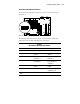
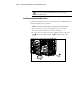
5. When removing the system board tray, disconnect and remove all cables
from the system board.
CAUTION: System board cables must be fully disconnected before the system
board tray is fully removed.
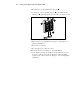
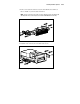
6. Press in at on the system board tray slides to release the latches, as
shown above.
7. Carefully pull or slide the system board tray back by the handle . Then
while supporting the bottom of the tray, lift away from the server.