
Compaq ProLiant ML530 Setup and Installation Guide


Installing Hardware Options 2-15
Compaq Confidential – Need to Know Required
Writer: Tricia Acevedo Project: Compaq ProLiant ML530 Setup and Installation Guide Comments:
Part Number: 139006-002 File Name: c-ch2 Installing Hardware.doc Last Saved On: 6/13/00 12:29 PM
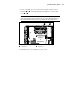
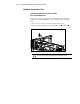
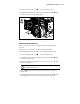
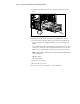
3. Remove and retain the rails and screws from the blanks. You will need
these to install on your removable media drive.
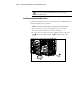
NOTE: For your convenience, four metric screws are attached to each removable media
drive bay blank. These screws may be used to install a CD-ROM drive into this bay.
Figure 2-12. Removing rails from a removable media drive bay blanks
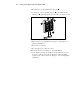
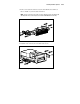
4. Install the side rails onto the removable media device.
Figure 2-13. Installing rails on a DLT or other removable media device