
Compaq ProLiant ML530 Setup and Installation Guide

2-24 Compaq ProLiant ML530 Setup and Installation Guide
Compaq Confidential – Need to Know Required
Writer: Tricia Acevedo Project: Compaq ProLiant ML530 Setup and Installation Guide Comments:
Part Number: 139006-002 File Name: c-ch2 Installing Hardware.doc Last Saved On: 6/13/00 12:29 PM
SCSI ID Numbers
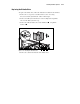
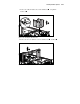
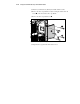
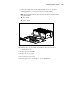
A label on the front of the unit indicates the numbering of each drive slot,
starting from the bottom of each drive cage, 0 to 5.
NOTE: This system contains a dual integrated controller with two SCSI channels. If one
channel is used for external SCSI or the removable media area, then another controller
will be necessary to run two 6-bay hot-plug SCSI drive cages.
NOTE: External SCSI is provided on the ProLiant ML530 by means of a cable from the
SCSI port B. Connect this cable to either embedded SCSI channel or to any other SCSI or
array controller. The cable can also be left disconnected if not needed. For information
about external storage devices and installing external SCSI connectors, see Chapter 5,
“Cabling Guidelines.”
Installing an Expansion Board
To install an expansion board, refer to the documentation that came with the
option kit, the Hardware Installation and Configuration poster included in the
shipping box, or the Expansion Board Installation Label located on the inside
of the server’s access panel. See Figure 2-2 for PCI slot identification.
There are considerations in selecting a slot for your PCI card. The three kinds
of PCI slots on the main board include:
■ 32-bit, 33-MHz
■ 64-bit, 33-MHz
■ 64-bit, 66-MHz 3.3 volt
To obtain the best performance from the PCI card and the slot, use the PCI
card that matches the specifications with the slot. The PCI card’s performance
can be affected if it is not in its specific slot. For example, a 66-MHz card can
be plugged into a 33-MHz slot, but it will perform as a 33-MHz card.
IMPORTANT: To access or install an expansion board, be sure that the server is in
Standby mode and that the power cords are disconnected from the electrical outlet. The
server shutdown procedure is discussed earlier in this chapter.