
Compaq ProLiant ML530 Setup and Installation Guide

2-26 Compaq ProLiant ML530 Setup and Installation Guide
Compaq Confidential – Need to Know Required
Writer: Tricia Acevedo Project: Compaq ProLiant ML530 Setup and Installation Guide Comments:
Part Number: 139006-002 File Name: c-ch2 Installing Hardware.doc Last Saved On: 6/13/00 12:29 PM
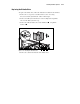
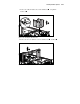
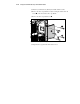
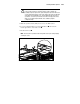
4. Press on the top of the expansion slot latch and rotate the latch toward
the rear
of the expansion slot cage.
5. Remove the expansion slot cover .
3
1
2
Figure 2-23. Opening expansion slot latch and removing slot cover
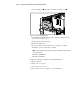
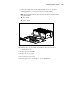
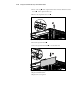
6. Insert the expansion board .
7. Close the expansion slot latch to secure the board.
1
2
Figure 2-24. Inserting and securing an expansion board
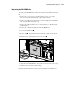
8. Replace the PCI retainer.
9. Replace the access panel.