
Compaq ProLiant ML530 Setup and Installation Guide

2-32 Compaq ProLiant ML530 Setup and Installation Guide
Compaq Confidential – Need to Know Required
Writer: Tricia Acevedo Project: Compaq ProLiant ML530 Setup and Installation Guide Comments:
Part Number: 139006-002 File Name: c-ch2 Installing Hardware.doc Last Saved On: 6/13/00 12:29 PM
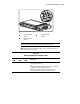
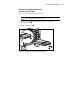
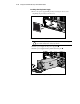
4. Insert the hot-plug SCSI hard drive into the empty drive bay, pushing
until seated as shown below.
5. Push the drive levers in to lock the drive in place .
1
2
Figure 2-27. Installing a hot-plug SCSI hard drive
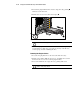
CAUTION: Make sure ejector levers are properly seated.
6. Place the hot-plug SCSI hard drive online as directed by your operating
system instructions. If the drive was replaced, the array controller does
an auto-spin up and starts rebuilding the drive.
Removing Hot-Plug Hard Drives
1. Locate the hot-plug hard drive to be removed from the drive bay.
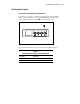
2. Push the release button. Pull the release lever, and pull the drive toward
the front of the server to remove the hot-plug hard drive.
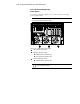
3. Insert a drive blank into the empty drive bay, pushing until seated.
CAUTION: During server operation, unused drive bays must contain a drive
blank to ensure proper airflow.