
Compaq ProLiant ML530 Setup and Installation Guide

Installing Hardware Options 2-41
Compaq Confidential – Need to Know Required
Writer: Tricia Acevedo Project: Compaq ProLiant ML530 Setup and Installation Guide Comments:
Part Number: 139006-002 File Name: c-ch2 Installing Hardware.doc Last Saved On: 6/13/00 12:29 PM
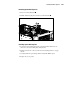
Removing System Hot-Plug Fans
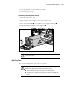
1. Press in on the locking latch .
2. Pull the failed hot-plug fan out of the system fan basket .
1
2
Figure 2-37. Removing a hot-plug system fan
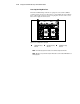
Installing System Hot-Plug Fans
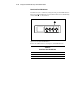
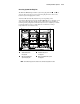
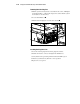
1. Lower the new hot-plug fan into the system fan basket until it rests on
the board connector, holding the locking latches.
2. Push the fan into the connector and release the locking latches to engage
the fan.
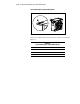
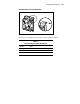
3. Verify that the fan is producing airflow and that the LED is green.
4. Replace the access panel.