
Compaq ProLiant ML530 Setup and Installation Guide

Server Installation 3-17
Compaq Confidential – Need to Know Required
Writer: Tricia Acevedo Project: Compaq ProLiant ML530 Setup and Installation Guide Comments:
Part Number: 139006-002 File Name: d-ch3 Installation.doc Last Saved On: 6/15/00 9:02 AM
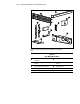
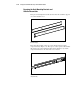
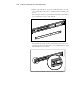
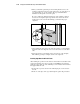
5. Lay the bracket rail inside the mounting bracket with the front of both
pieces oriented in the same direction. Align the front screw holes in the
mounting bracket and the bracket rail.
To identify the front of the mounting bracket and the bracket rail:
G The front of the mounting bracket has alignment tabs on its flange.
G The front of the bracket rail allows the inner slide to move forward
on ball bearings.
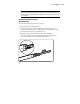
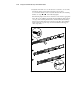
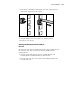
6. Extend the inner slide from the front of the bracket rail. With this piece
extended, you will see two screw holes aligned in the mounting bracket
and the bracket rail. These are the two exposed holes near the back end
of the bracket rail and the front hole accessible through a slot in the
inner slide.
7. Fasten the bracket rail to the mounting bracket with one 8-32 x 1/4-inch
slotted screws.
(Do not use nuts or washers with the screws.) See
Step
of Figure 3-11.