
Compaq ProLiant ML530 Setup and Installation Guide

3-22 Compaq ProLiant ML530 Setup and Installation Guide
Compaq Confidential – Need to Know Required
Writer: Tricia Acevedo Project: Compaq ProLiant ML530 Setup and Installation Guide Comments:
Part Number: 139006-002 File Name: d-ch3 Installation.doc Last Saved On: 6/15/00 9:02 AM
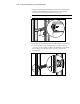
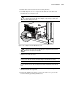
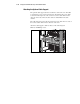
3. Attach a mounting bracket assembly to the front of the rack first, using
one M6 x 1.0-12L Phillips screw in the bottom hole of the bracket.
Do not use the washers supplied with the Compaq rack.
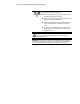
IMPORTANT: Use only the bottom hole of the bracket as shown in the following figure.
CZR4-012.eps
Top View
Figure 3-14. Attaching mounting bracket assembly to the front of the rack
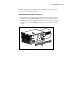
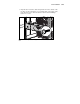
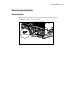
4. Carefully align the mounting bracket assembly with the rear rack frame.
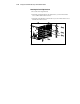
5. Secure the back end of the mounting bracket assembly to the back
corner brace of the rack with one M6 x 1.0-12L Phillips screw through
the bottom hole of the bracket and the cage nut, as shown in the
following figure.
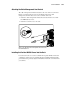
Figure 3-15. Cage nut and back of mounting bracket assembly installed