
Compaq ProLiant ML530 Setup and Installation Guide

3-30 Compaq ProLiant ML530 Setup and Installation Guide
Compaq Confidential – Need to Know Required
Writer: Tricia Acevedo Project: Compaq ProLiant ML530 Setup and Installation Guide Comments:
Part Number: 139006-002 File Name: d-ch3 Installation.doc Last Saved On: 6/15/00 9:02 AM
Attaching the Optional Cable Support
The optional cable support attaches to both sides of the rack’s rear. All cables
to and from the server are tied to this support, which allows the server cables
to stretch from the right rear of the server across to the cable channel on the
other side of the rack, where the other cables are all bundled in the cable
channel.
The cable support is needed only if you intend to route cables from one side of
the rack to a cable channel on the other side of the rack.
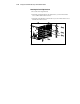
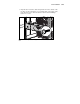
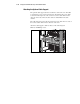
Attach the cable support to both rear braces of the rack using four
M6 x 1.0-12L Phillips screws.
Figure 3-22. Attaching the ProLiant ML530 cable support to the rack