
HP ProLiant ML570 Generation 2 Server Setup and Installation Guide

System LEDs and Switches
HP ProLiant ML570 Generation 2 Server Setup and Installation Guide C-13
HP CONFIDENTIAL
Writer: Wendy Wing File Name: l-appc System LEDs and Switches.doc
Codename: Time Bandit Part Number: 223960-002 Last Saved On: 8/22/02 11:22 AM
Hot-Plug Hard Drive LEDs
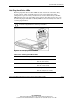
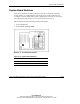
Each hot-plug hard drive has three LEDs located on the front of the drive. They
provide activity, online, and fault status for each corresponding drive when
configured as a part of an array and attached to an active Smart Array Controller.
LED behaviors may vary, depending on the status of other drives in the array. Use
the following figure and tables to identify LED locations and analyze the status of
each hot-plug hard drive.
CAUTION: Read the “Hot-Plug Hard Drive Replacement Guidelines” in the Servers
Troubleshooting Guide before removing a hard drive.
Figure C-10: Hot-plug hard drive LEDs
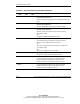
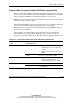
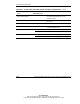
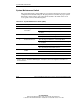
Table C-10: Hot-Plug Hard Drive LEDs
LED Description State
1 Drive activity On = Drive activity
Off = No drive activity
2 Online status Flashing = Online activity
Off = No online activity
3 Fault status Flashing = Fault-process activity
Off = No fault-process activity